
Office Personnel System (OPS)
Explore the inner workings of OPS. Select any module below to inspect real software interface screens alongside their corresponding workflows and enterprise functionalities.

Explore OPS Screens & Core Functionality
Choose a module, then a page inside it. This inventory follows the product’s Module → Pages → Features structure. Actual availability, labels, and access depend on deployment settings and user permissions.
Dashboard
Dashboard
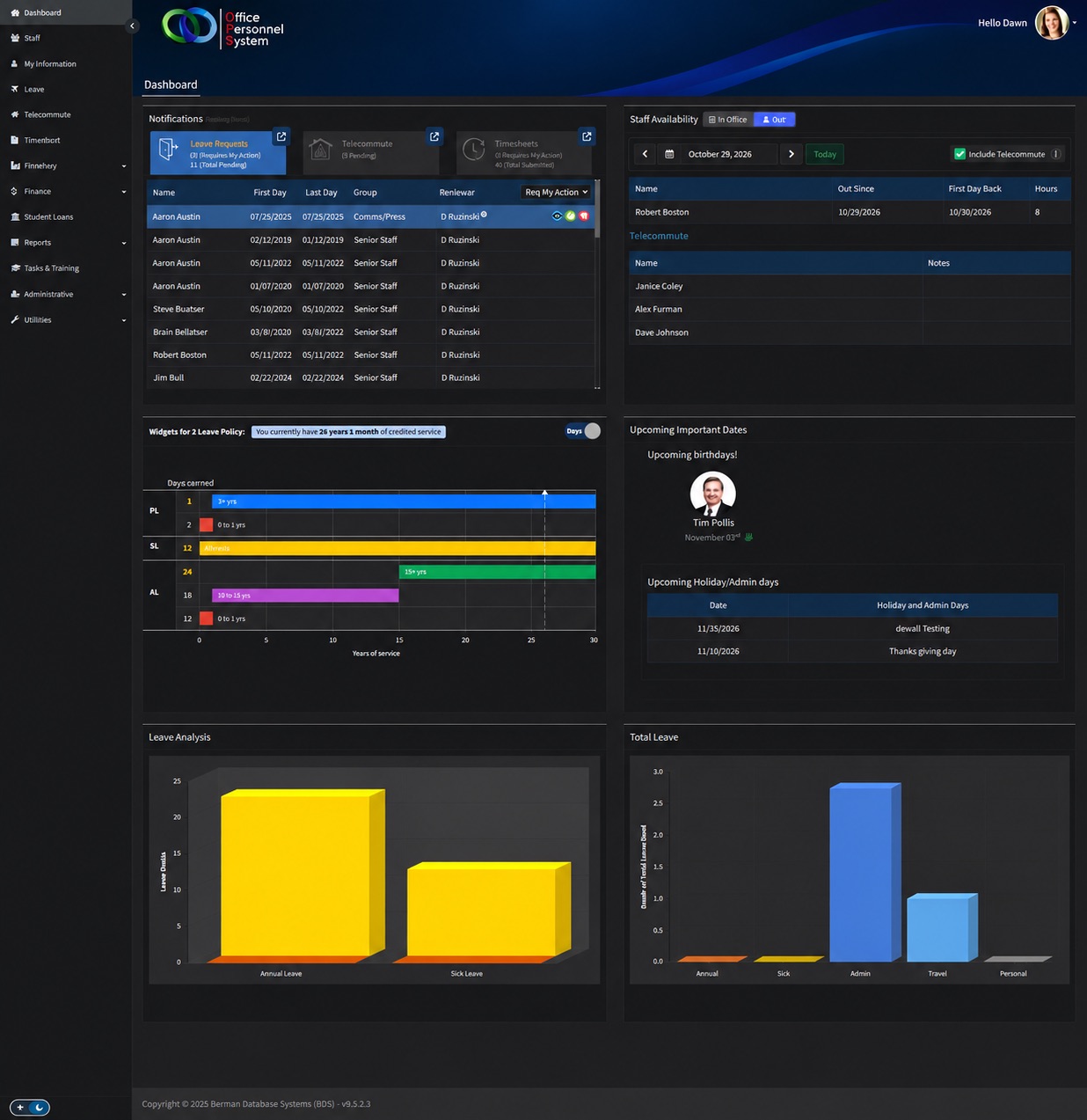
Provides a starting screen with staff availability, leave information, pending work, announcements, and upcoming dates. Users can quickly identify items that need attention.
Staff Availability
Shows which employees are away. Telework information can also be included, helping managers understand who is available and who is working remotely.
Pending Actions
Displays leave requests and timesheets waiting for action, helping reviewers find outstanding submissions.
Leave Analysis
Presents leave summaries so users can understand leave usage and balances.
Important Dates
Displays upcoming employee birthdays, holidays, and administrative days.
Need a customized walkthrough of OPS functionalities?
We can demo how OPS tailors to your exact HR policies, approval hierarchies, and payroll rules.
Schedule a Personalized Guided Tour
Our product specialists will walk your team through custom configurations, security policies, and third-party integrations tailored to your organization.